Review guest resharing in SharePoint and OneDrive
Review whether guests can reshare items they don't own, alongside their site permissions.
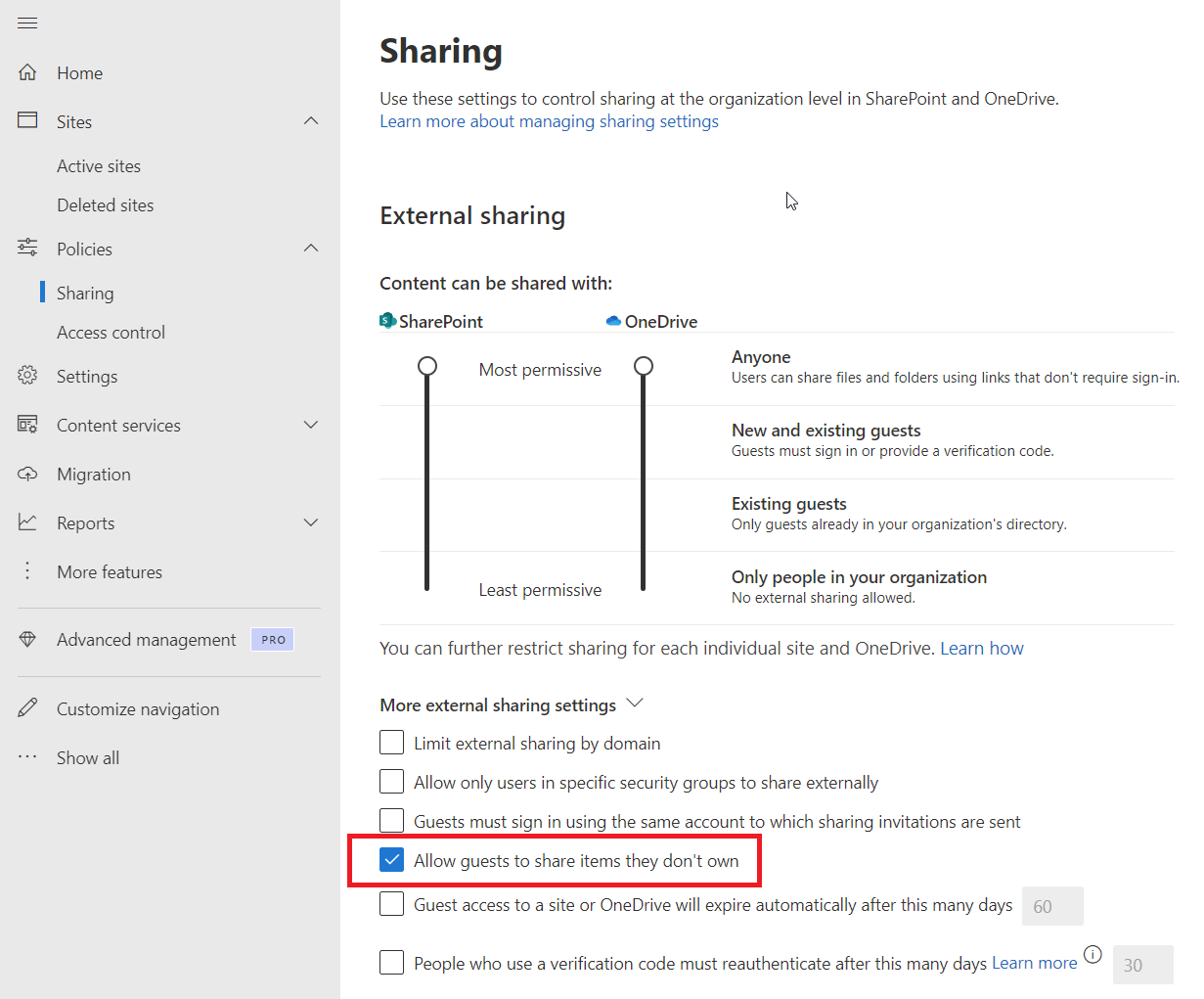
Here’s a SharePoint and OneDrive sharing setting worth checking: Allow guests to share items they don’t own.
In the SharePoint admin center, go to Policies > Sharing, then expand More external sharing settings. Review that checkbox alongside your organization’s external sharing requirements. If guests shouldn’t be able to invite others to content they don’t own, consider clearing it and saving after checking the impact on your collaboration workflows.
You can inspect the related tenant property with the SharePoint Online Management Shell:
1Get-SPOTenant | Select-Object PreventExternalUsersFromResharing
The property name is the inverse of the checkbox: True restricts guest resharing of content they don’t own. Check your tenant’s actual value.
This setting doesn’t cover every guest sharing scenario. Microsoft documents exceptions for guests who own the content or have Full Control. Review guest ownership and permissions as well as the organization and site sharing settings, then test with a representative guest account.
Sharing settings guidance · PreventExternalUsersFromResharing reference
Original post: 22 May 2024. Documentation checked 13 October 2026.