Check which Defender email policy wins
Check preset policy scope before expecting a custom email protection policy to apply.
Changed a custom email protection policy and the user still gets the old behavior? Check which policy actually applies before changing more settings.
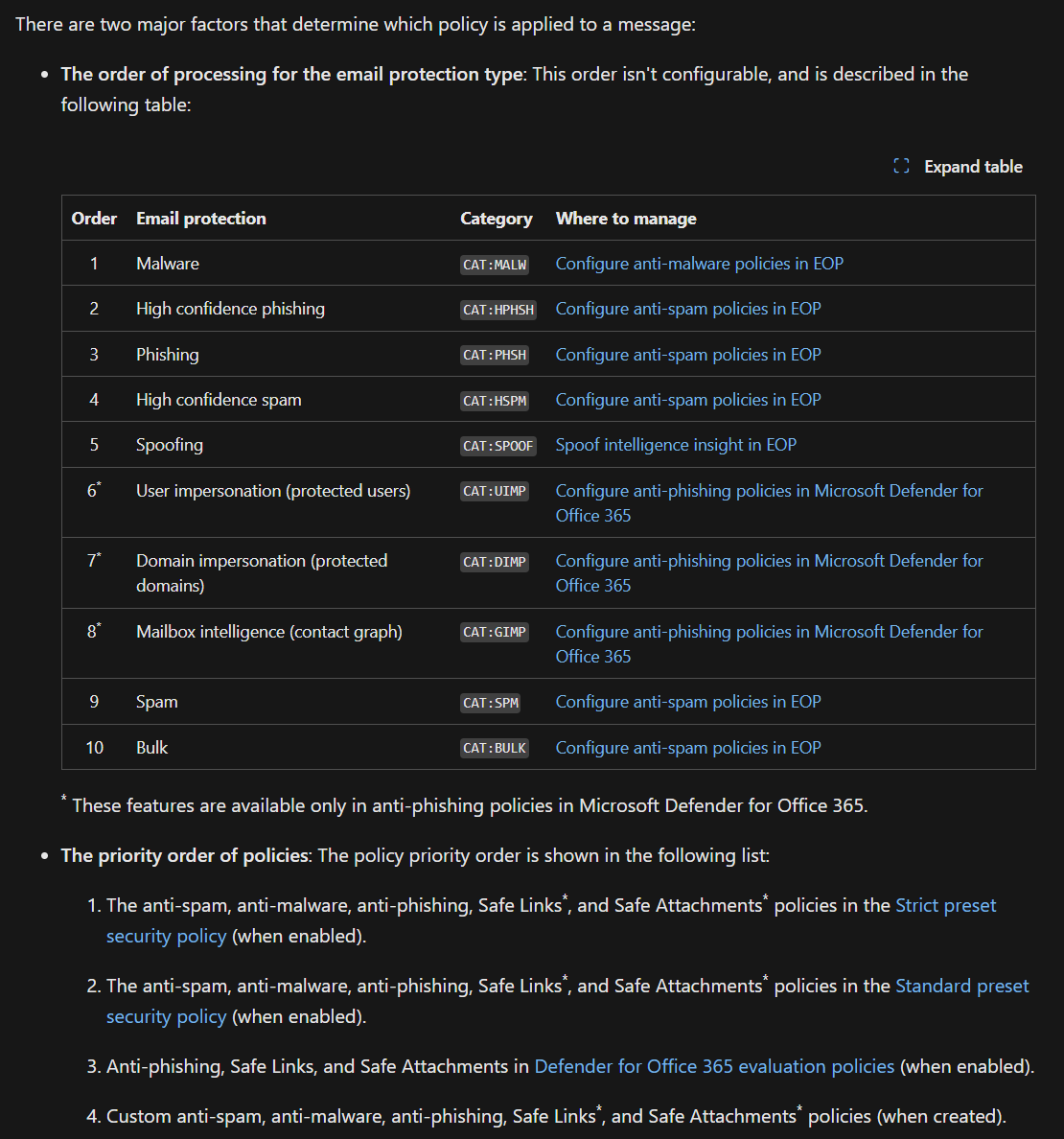
For the same protection type, Strict preset security policies take precedence over Standard presets. Those Strict and Standard presets also take precedence over custom policies. Setting a custom anti-spam policy to priority 0 won’t move it above a Strict or Standard preset that includes the same recipient.
Microsoft applies the first matching policy of each type. Settings from multiple anti-spam policies, for example, aren’t combined into one policy. A recipient can still have different policies applying for different protection types, such as anti-spam and Safe Links.
Start with the affected recipient:
- Check the recipient scope and exclusions in Strict and Standard presets.
- Check the relevant custom policy’s scope and priority.
- Use Microsoft’s order and precedence reference for that protection type, including evaluation and default policies.
That page also explains the processing order for different detections. Policy selection and the final verdict on a message are separate things to check, so keep the reference handy when troubleshooting.
Original post: 19 March 2024. Documentation checked 13 October 2026.